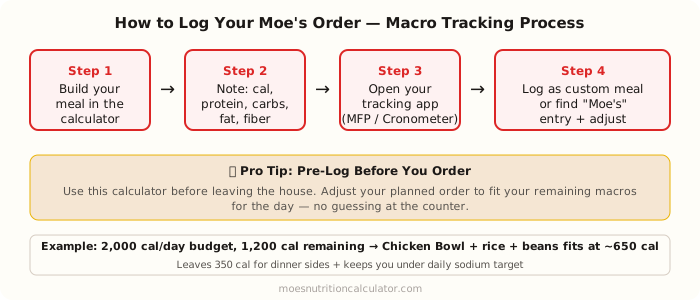
Quick answer: The most reliable way to track Moe's macros is to build the meal in a calculator before you order, write down the six numbers (calories, protein, carbs, fat, fiber, sodium), and log it as a custom meal in whatever app you use. Generic "Moe's Chicken Bowl" entries in MyFitnessPal are basically useless because they represent somebody else's build, not yours.
Macro tracking at Moe's is harder than it sounds, and the reason is that a "Moe's chicken bowl" isn't a single item . it's five to eleven ingredients with their own numbers, stacked in whatever combination you decided on at the counter. Search for "Moe's Chicken Bowl" in any tracking app and you'll find a dozen contradictory entries, sometimes off by 300+ calories from each other. Logging that and calling it accurate is self-deception.
The only method that actually works is ingredient-level, and the only way to do it efficiently is to front-load the work . calculate the meal before you order it, not after.
Why Generic App Entries for Moe's Are Unreliable
User-submitted database entries in MyFitnessPal, Lose It, or similar apps are based on specific builds that may not match yours. A "Moe's Chicken Burrito" entry created by another user might include different toppings, different portion assumptions, or simply be wrong.
The errors are significant:
- A generic "Moe's Chicken Bowl" entry might show 550 calories for what's actually 820 calories (if it doesn't account for guacamole and queso you added)
- Or 800 calories for what's actually 460 (if you skipped rice and beans)
- Protein estimates can vary by 20g+ between database entries
For occasional tracking, this imprecision might not matter. For consistent fitness goals . building muscle, cutting fat, managing a medical condition . you need accurate numbers.
The workflow that actually works
There are three pieces, and the order matters. First, build your planned meal in a calculator . this one, for example . before you leave the house. Type in the exact ingredients you intend to order and write down the six numbers it gives you: calories, fat, carbs, protein, fiber, sodium. This takes about ninety seconds.
Second, go to Moe's and order exactly what you calculated. I know this sounds obvious, but the number of people who plan one thing and then impulse-add guacamole at the counter is basically everyone, myself included. If you're going to plan, follow the plan. If you change the order at the counter, the tracking is already off.
Third, open your tracking app and log the meal as a custom entry. In MyFitnessPal, that's Diary → Add Food → Create a Meal, then type in the six values. In Cronometer, it's Diary → Add Food → Custom Food. Give it a specific name . "Moe's Chicken Bowl . Rice, Black Beans, Cheese, Pico" . so you can find it again next week when you're ordering the same thing. If you eat at Moe's regularly, you'll build up a little library of your usual orders and logging becomes a two-click operation.
Using MyFitnessPal's Moe's Database Entries (With Caution)
MyFitnessPal does have official Moe's entries in their database, submitted by Moe's. Look for entries marked with a green checkmark (verified) and labeled specifically . "Moe's Southwest Grill . Chicken" as a standalone ingredient, for instance.
The issue is that Moe's doesn't always submit ingredient-level data to MyFitnessPal . they submit meal combos. If you can find verified per-ingredient entries, you can build your meal by adding each component separately. This mirrors what our calculator does, and it's the most accurate tracking method within the app.
Logging Each Component Separately
If you prefer tracking within your app rather than creating a custom meal:
1. Search "Moe's chicken" for the protein
2. Search "Moe's cilantro lime rice" for rice
3. Search "Moe's black beans" for beans
4. And so on for each ingredient
Verified Moe's brand entries in MyFitnessPal typically match our calculator's values (they're sourced from the same official Moe's nutrition data). If a per-ingredient entry shows data similar to what our calculator shows for that ingredient, it's likely accurate.
Accounting for the Salsa Bar
This is where most tracking falls apart. The salsa bar at Moe's . including various fresh salsas, vinegar salsas, and condiments . isn't covered by our calculator (we cover the main-counter ingredients only). If you use salsa bar items, you'll need to estimate:
- Pico-style fresh tomato salsa: typically 10–20 cal per tablespoon, very low sodium
- Verde/tomatillo salsa: similar range
- Chipotle or smoky sauces: 30–60 cal per tablespoon, higher sodium
- Creamy-style dressings: 80–150 cal per 2 tablespoons
For precise tracking, either skip the salsa bar entirely, or treat it as a 50–100 calorie buffer in your daily log.
Pre-Logging: The Game Changer
The most effective macro tracking strategy isn't logging what you ate . it's planning what you'll eat. Pre-logging Moe's means:
1. You check your remaining daily macros (say, 800 cal, 50g protein, 80g carbs remaining)
2. You build a Moe's meal in the calculator that fits those remaining macros
3. You order that exact meal
4. You log it immediately after ordering (or before)
This approach lets Moe's be part of a precisely managed eating day rather than a variable that blows your macros. It requires 2 minutes of planning. For people who use Moe's as a regular meal, this becomes automatic after a few visits.
Practical Example: Fitting Moe's Into a 2,000 Calorie Day
Scenario: You're targeting 2,000 calories, 150g protein, 200g carbs, 65g fat per day. You've eaten 1,100 calories so far today . 300 at breakfast, 800 at lunch. You need roughly 900 more calories from dinner and snacks.
You want Moe's for dinner. Opening the calculator:
Option A: Chicken Bowl + Rice + Black Beans + Cheese + Pico
- Calories: 650, Protein: 53g, Carbs: 69g, Fat: 21g
- This leaves you 250 calories for a snack, meets protein needs
Option B: Steak Bowl + Black Beans + Guacamole + Pico (no rice)
- Calories: 530, Protein: 46g, Carbs: 21g, Fat: 37g
- Leaves 370 calories, but the fat is high . might push over your daily fat target
Option A fits better for the 2,000/150/200/65 targets. You'd log it in your app before leaving the house.
A few small things that make this easier
The biggest single improvement most people can make is pre-calculating before ordering, not after eating. It's a discipline thing, not a technical thing . the tools are free and the process takes under two minutes.
Build a custom meal entry for your regular order once, then reuse it. If you use the salsa bar, tack on a 50–100 calorie buffer; you're guessing anyway and overshooting slightly is better than undershooting. And cross-check any "verified" Moe's entry in your app against the calculator . if the numbers match for the specific ingredients, the entry is probably fine to use directly.
For related reading, see the bowl nutrition breakdown and the high-protein builds post. The about page explains where every number on this site comes from.